
Articles
What Is CRM Software? A Complete Guide to Buying the Best Persian CRM for Sales
If you're evaluating CRM software for your business, request a free 30-minute demo today. Our specialists will walk you through how each capability maps to your sales, support, and automation needs. Request a Free Demo
What Is CRM Software? A Complete Guide to Buying the Best Persian CRM for Sales
When sales leads fall through the cracks and your reps can't tell which customer is ready to buy and which is about to churn, the underlying problem is almost always the same: the business needs CRM software. In a competitive market, the companies that win are the ones that focus on the customer relationship rather than rigid administrative processes.
This guide explains what a customer relationship management system is, what problems it solves, and how a Persian-language Iranian CRM can transform your sales organization — without exaggerated claims and grounded in the product's actual capabilities.
What Is CRM Software?
CRM stands for Customer Relationship Management. CRM software is a platform that records and manages every interaction your business has with current and potential customers in a single, centralized place.
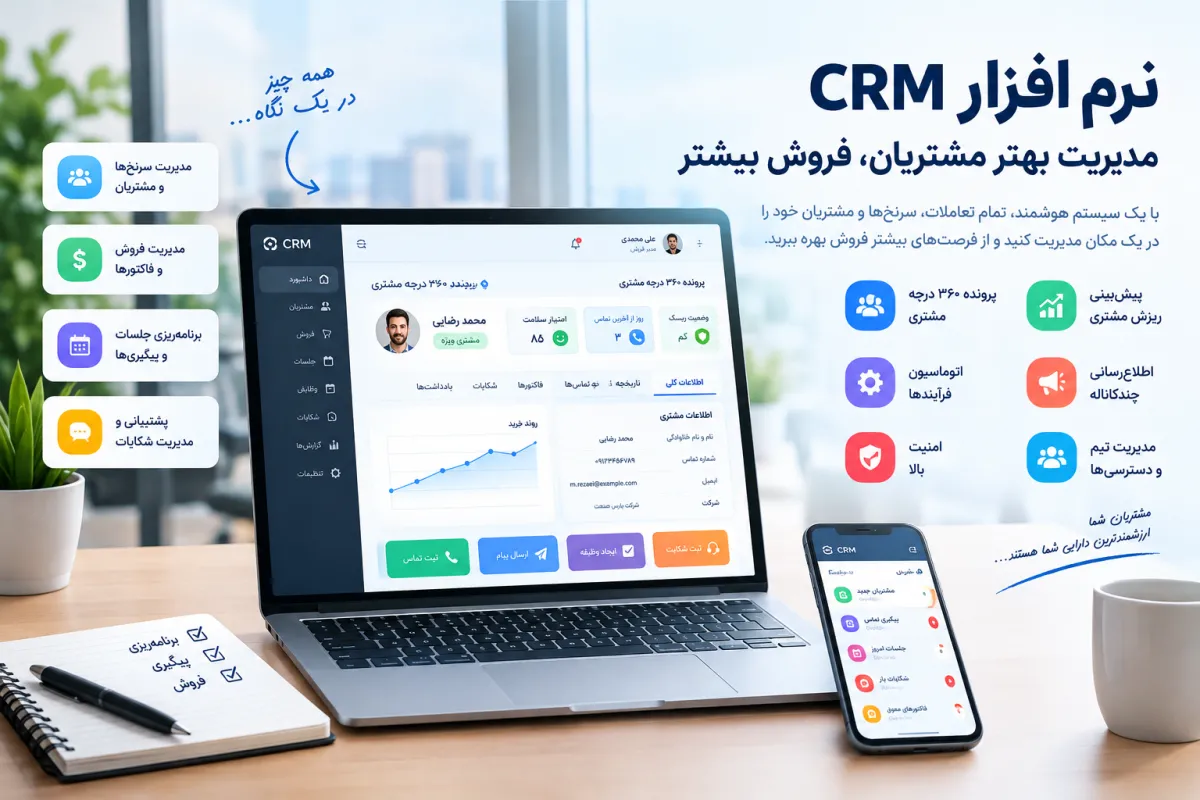
Contrary to the common misconception that a CRM is just a digital phone book, modern customer management software brings each customer's calls, meetings, notes, attached files, sales opportunities, invoices, and complaints into a single profile, so that sales and support teams always know exactly who they're dealing with and at what stage of the sales process.
In its simplest form: a CRM extracts scattered customer information from Excel sheets, WhatsApp chats, emails, and individual reps' memories, and places it in a structured, searchable, shareable store. That centralization is the foundation of every informed sales and support decision that follows.
Why Businesses Need Sales Management Software
Many traditional companies still manage sales with spreadsheets or simple accounting tools. As the organization grows and the customer base expands, these methods break down: customer data lives only in the rep's head, leads get forgotten, follow-ups slip, and the sales manager has no real-time picture of pipeline or team performance. A proper sales management software addresses these pain points directly:
- Prevents customer loss: when a sales rep leaves, customer data stays in the system and the next rep can pick up immediately.
- Higher conversion rates: timely follow-ups and visibility into every lead's status keep opportunities from slipping away.
- Faster response times: quick access to a customer's full record lets support resolve issues faster and lift satisfaction.
- Accurate reporting: the sales manager can review pipeline and team performance without assembling spreadsheets by hand.
- Process automation: repetitive tasks like follow-up reminders or churn-risk alerts run automatically, freeing reps to sell.
CRM vs. Accounting Software vs. Spreadsheets
Accounting software is built around financial documents — invoices, journal entries, tax calculations. Spreadsheets are general-purpose grids that work for structured data analysis but weren't designed to manage a customer's lifecycle.
CRM software is built around the customer profile, organizing financial, interactional, and support information around that single entity. This architectural difference is what allows a CRM to support prediction and proactive action rather than mere recording.
A Customer-First Architecture: Why This Persian CRM Is Different
The biggest mistake many CRM products make is building their core around invoices or inventory. In this platform, the architectural decision is locked around one principle: the core of the system is the customer profile. This customer-first approach means that contacts, files, notes, tags, interactions, sales opportunities, complaints, and health scores all live in related structures tied to a single customer record — so when a rep opens a profile, they get the full picture in one place.
Unified Customer Profile
The data model includes a primary customers table together with related tables for contacts, files, notes, tags, and interactions. Every customer has a single profile where identity information, multiple communication channels, attached documents, rep notes, and classification tags sit side by side.
When a sales rep opens a customer record, they no longer need to jump between three applications and an Excel file — everything is in one view. Business value: cuts information lookup time from minutes to seconds, eliminates version-conflict errors from duplicated data, and makes rep handovers seamless because the customer record is complete and shareable.
Contact Records and Customer History
Each customer can have multiple contact records — office phone, mobile, email, address, and more — stored separately in the customer_contacts table and individually searchable. This structure is critical for B2B companies that need to track several people inside a single client organization as separate contacts.
Interactions and Notes
Every call, meeting, email, or other interaction is logged in the interactions table and can be tagged (for example, "cold call", "demo meeting", "contract follow-up"). Free-form rep notes go into customer_notes. Together, these tables let the sales team reconstruct a customer's complete history and walk into the next conversation with full context.
Customer Tagging
Using the customer_tags and tags tables, customers can be segmented along any dimension you choose: industry, company size, sales stage, deal value, geographic region. These tags feed into filters and reports and power meaningful audience segmentation.
What Is a Customer Health Score?
A customer health score is a numeric indicator of the overall state of the relationship between a customer and your business. In this Persian CRM, the customer_health_scores table is designed with fields for five factors:
- recency — time since last purchase
- monetary — financial value of transactions
- frequency — number of purchases and interactions
- sentiment — the customer's emotional tone across interactions
- complaints — number and severity of complaints
The recorded weights for these five factors are 30%, 20%, 25%, 15%, and 10% respectively. In sample data, three statuses are used to classify customer state: healthy, at_risk, and critical. This structure lets the sales team spot warning signs early and take preventive action instead of reacting only after a customer has churned.
Transparency note: The health-score structure with its five factors and explicit weights is defined in the database. The details of the final calculation algorithm and prediction accuracy require technical review. This article does not claim "definitive churn prediction" — it only reports the existence of the scoring structure and status classification.
The Five Factors Behind the Score
- Recency (30%): the longer the gap since the last purchase or interaction, the lower the score. This is the heaviest-weighted factor.
- Frequency (25%): repeat purchases and interactions signal active engagement.
- Monetary (20%): the financial value of transactions reflects the customer's economic importance.
- Sentiment (15%): the overall tone of the customer's interactions, inferred from notes and complaints.
- Complaints (10%): number and severity of complaints act as a penalty factor.
How Sales Teams Use the Health Score
By monitoring health scores daily, the sales team can produce a focused list of customers in at_risk or critical state and prioritize outreach to the customers most at risk of churning, rather than running generic call-down lists. The platform also defines a rule that raises an alert for the manager whenever a customer's health score drops to 40 or below, accelerating intervention.
This combination of data plus rules lets the sales manager direct the team by real priority rather than by guesswork. When a customer moves from healthy to at_risk, the team can reach out before that customer defects to a competitor and dig into why the score dropped.
Mid-article CTA: Want to see where your customers actually stand on a health score? In the free demo, our specialists walk through how the score is structured and applied using sample data. [Button: Book a 30-Minute Demo]
Lead and Pipeline Management
Every lead that enters the system can be converted into a sales opportunity (a deal). The deals table includes fields for deal value, status, win probability, expected close date, and the products attached to the deal. The deal_products table allows the exact product mix proposed in each opportunity to be recorded.
This structure gives the sales manager a stage-by-stage view of the pipeline: how many deals are in early qualification, in negotiation, near closing, or lost. The probability-weighted sum of deal values (value × win probability) provides a rough forecast for the period's sales.
Tasks and Reminders
Without task management, even the best CRM degrades into a passive data store. The tasks table lets reps log tasks with fields for assignee, priority, status, and due date. Each task can be linked to a customer, a deal, or a complaint. The reminders table captures scheduled nudges so that nothing important falls through the cracks.
One rule defined in the system deducts five KPI points from the assignee whenever a task passes its due date. This rule signals to the team that a due date isn't just a label — it's a performance measure.
Workflow Automation Rules
Automation is what separates a professional CRM from a digital phone book. In this product's data model, three tables — rules, rule_conditions, and rule_actions — let administrators define custom rules with explicit conditions and actions. The rule_executions table logs every execution so the audit trail is complete.
Sample Automation Rules
Four sample rules are defined in the platform:
- Seven-day follow-up rule: if a customer hasn't been contacted in seven days, create a follow-up task for the assigned rep.
- Health-score alert rule: if a customer's health score is 40 or below, raise an alert for the sales manager.
- Complaint escalation rule: a complaint still unresolved after 48 hours is escalated to a higher tier and a notification is sent.
- KPI rule: a task past its due date deducts five KPI points from the assignee.
In addition to rules, six scheduled jobs are defined in the cron_jobs table: backup, complaint_escalation, decision, due_alerts, health_score, and reminders. The presence of these records indicates that periodic system jobs are designed into the platform. Whether each job actually executes automatically in the production environment requires confirmation from the technical team.
Complaint Management and Customer Experience
Every complaint is either an opportunity to retain a customer or the moment you lose them. The complaints table is designed with fields for priority, status, response time, resolution time, and escalation tier. A rule defined in the platform escalates any complaint still unresolved after 48 hours to a higher tier and triggers notification. This rule replaces reliance on a rep's memory and ensures no significant complaint is forgotten in the queue.
The 48-hour window is meaningful in the system configuration — complaints aren't treated as static records but as time-managed flows where every hour of delay carries business weight.
The 48-Hour Escalation Rule
When a complaint is filed, its clock starts. If it doesn't reach a resolved state within 48 hours, the escalation rule fires: the complaint is moved to a higher tier (for example, from support rep to team lead, or from team lead to manager) and a notification is generated.
This mechanism is defined in the data model and in the rule configuration. Whether it executes automatically in the production environment requires technical confirmation. In customer conversations, instead of "automatic escalation," use "the escalation rule is defined in the structure."
After-features CTA: You've now seen the product's core: customer profile, health score, pipeline, automation, and complaints. If you want to see how these capabilities work together in practice, book a free walkthrough. [Button: See the Demo]
Orders, Invoices and Payment Follow-ups
The data model includes a complete set of tables for orders, invoices, and payments: orders, order_items, order_payments, order_returns, order_return_items, order_status_history, invoices, invoice_items, invoice_counters, doc_sequences, and payment_followups.
Recorded order statuses include draft, registered, confirmed, preparing, shipped, delivered, cancelled, returned, and partially_returned. This means an order is traceable across nine stages, from initial entry through final delivery or return.
The structure also supports cash, installment, and check payments, plus payment follow-up tracking. Document counters (doc_sequences) and automatic invoice numbering (invoice_counters) are built into the structure.
Transparency note: In the examined database sample, the order and invoice tables had complete structures but no INSERT records were observed. For that reason, the operational readiness and UI completion of this module require separate confirmation before being presented as fully functional to customers. In customer conversations, use "the complete order and invoice structure is defined in the data model" rather than "the module is production-ready."
Products, Warehouses and Inventory Movements
The products table defines catalog items, warehouses defines storage locations, and product_stock holds the on-hand quantity of each product in each warehouse. The stock_movements table records eight movement types, covering every inventory operation:
- receipt — receiving goods
- issue — issuing goods
- adjustment — correcting stock
- transfer_in — inter-warehouse transfer (inbound)
- transfer_out — inter-warehouse transfer (outbound)
- reserve — reservation for an order
- release — releasing a reservation
- return_in — receiving returned goods
Stock Movements and Stocktakes
The stocktakes and stocktake_items tables are designed for periodic physical counts and let the team record discrepancies between actual and system inventory. The product doesn't just record stock — it gives the warehouse team tools to correct and reconcile it.
The structure of this section is complete; UX completion and operational testing require confirmation.
Teams, Roles and RBAC
No CRM can serve an organization without a meaningful access structure. In the data model, the users, roles, permissions, role_permissions, departments, positions, teams, and team_members tables support a complete organizational chart. Sample roles defined in the system include CEO, Sales Manager, Team Lead, Sales Agent, Support, and System Admin.
A total of 24 permissions and 81 role-permission mappings are defined. This means the system administrator can precisely control which data each role can access, which actions it can perform, and which sections are view-only. The RBAC structure exists; the detailed behavior of every page and access restriction in the UI cannot be proven from the database alone.
KPIs and Sales Performance
The kpi_logs table provides the infrastructure for logging performance events — such as on-time task completion, KPI deductions from overdue tasks, or deal stage changes. This data is the foundation for team performance reporting.
A management dashboard, live charts, or an advanced report builder require separate implementation and aren't proven by this table alone. In customer conversations, use "the infrastructure for logging performance data exists" rather than "a complete management dashboard."
Surveys and NPS
The data model includes surveys, survey_questions, survey_responses, survey_answers, nps_responses, suggestions, and thanks_messages. This set supports multi-question survey design, response capture, NPS (Net Promoter Score) calculation, suggestion collection, and thank-you message delivery.
NPS is one of the most important organizational-level customer satisfaction metrics, and the presence of this structure enables data-driven, regular satisfaction monitoring.
Transparency note: The exact delivery method — automated, manual, or end-of-interaction — is defined in the structure but requires operational confirmation.
Multi-Channel Notifications
The data model defines six notification channels: WhatsApp, Telegram, Bale, SMS, email, and in-app. The notifications, , and notification_templates tables handle message delivery, delivery status reporting, and template management respectively. The integration_settings table defines connections for whatsapp_official, parsgreen_sms, telegram_bot, bale_bot, smtp, recaptcha, and turnstile.
Critical transparency note: In the examined data, all seven integrations were inactive (
is_active = 0) with empty configuration. In other words, channels and integrations are defined in the product's structure, but activating each channel requires dedicated configuration by your technical team. Be transparent about this in customer conversations so you don't claim an "active connection to all messengers."
Security and Session Management
The data model includes login_logs, user_sessions, otp_codes, and audit_logs, providing the infrastructure to log security events: logins, active sessions, one-time passcodes, and change audits. Password policy settings include minimum length 8, 60-minute session expiry, and a maximum of 5 login attempts.
2FA-related fields exist in the users table, but the overall 2FA status is disabled in settings; enabling it requires configuration.
Transparency note: No absolute security claim — such as "AES-256 encryption," "100% protection against SQL injection," or "full 2FA implementation" — is permitted without source code review and an independent security test. In customer communications, use precise phrases like "login, session, and OTP infrastructure is built into the data model."
Multilingual Support
The product's data model supports four languages: Persian, English, Arabic, and Turkish, with Persian and English active in the examined data. System settings include the Asia/Tehran time zone and the IRR currency unit. Right-to-left (RTL) and left-to-right (LTR) rendering is built into the translation structure.
Transparency note: The presence of translations in the database alone doesn't prove that every page is fully translated. Before delivering to a multilingual customer, the content team should review translation completion on critical pages.
Cloud CRM vs. Traditional Installed Software
When buying customer relationship management software, buyers typically weigh traditional installed systems against modern web-based platforms. The key differences are access, maintenance, and total cost of ownership.
|
Dimension
|
Web-based CRM (this product)
|
Traditional installed software
|
|---|---|---|
| Access | Any device with a browser | Only on the installed machine |
| Maintenance | Centralized updates by the vendor | Manual updates per installation |
| Upfront cost | Subscription or license + support | One-time license + server cost |
| Multi-user support | Native to web architecture | Requires network setup |
| Management reporting | Accessible from anywhere | Limited to installed machine |
| Multilingual | Built-in RTL/LTR structure | Depends on implementation |
The product is built on PHP and MySQL; we recommend that the host confirm at least PHP 8.1 and MySQL 8. Claiming "flawless execution on any host" is not appropriate — actual compatibility depends on server configuration, PHP modules, and resource limits.
After-comparison CTA: If you're still comparing options in the market, book a free 30-minute consultation and we'll map your needs to this product's capabilities. [Button: Free Consultation]
Which Businesses Is This CRM Right For?
Because of its customer-first architecture, deal structure, health score, and complaint management, this sales management software delivers the most value to the following business types:
- Pharmaceutical and medical-equipment companies: manage field reps, track orders from pharmacies and hospitals, and log field interactions through the tags and interactions tables.
- Advertising and marketing agencies: follow up on leads from campaigns, manage client projects with tasks and reminders, and run NPS surveys at project close.
- B2B service companies: track contracts, issue recurring invoices, send payment reminders, and manage complaints with the 48-hour escalation rule.
- Large online stores: manage support, shipping complaints, satisfaction surveys, and segment customers by purchase value.
- Sales teams with multiple org levels: use RBAC to separate access for sales manager, team lead, and rep, and roll up hierarchical reporting.
CRM Buyer's Guide: How to Choose
Choosing the right CRM matters more than choosing the cheapest CRM. As you evaluate options in the market, weigh these five criteria:
- Architectural core: is the product built around invoices or around the customer profile? A customer-first core lets you manage sales from the customer's angle, not the financial document's angle.
- Automation structure: can rules be defined? Are conditions and actions separately configurable?
- Customer health score: does the product have a numeric health metric or only a qualitative status? A numeric score enables quantitative prioritization.
- Complaint management: does the structure include time-based escalation? Are resolution time and escalation tier captured?
- Capability transparency: does the vendor clearly say which features are active and which require configuration? Transparency is a signal of confidence in the product.
How Much Does CRM Software Cost?
The price of CRM software varies with the organization's needs: number of users, requested modules, customizations, and support level. Because of that, publishing a single fixed number on this page would be misleading.
For an accurate quote matched to your organization, fill out the demo request form and our specialists will scope your needs on a consultation call before sharing a tailored price.
If you're evaluating CRM software for your business, request a free 30-minute demo today. Our specialists will walk you through how each capability maps to your sales, support, and automation needs. Request a Free Demo
Have a custom project?
Talk to Mazweb to review your needs and find the right path.
Start the conversation

Comments 0
No comments yet. Be the first to comment.
Leave a comment