
Service
Taskora — All-in-One Business Management Software
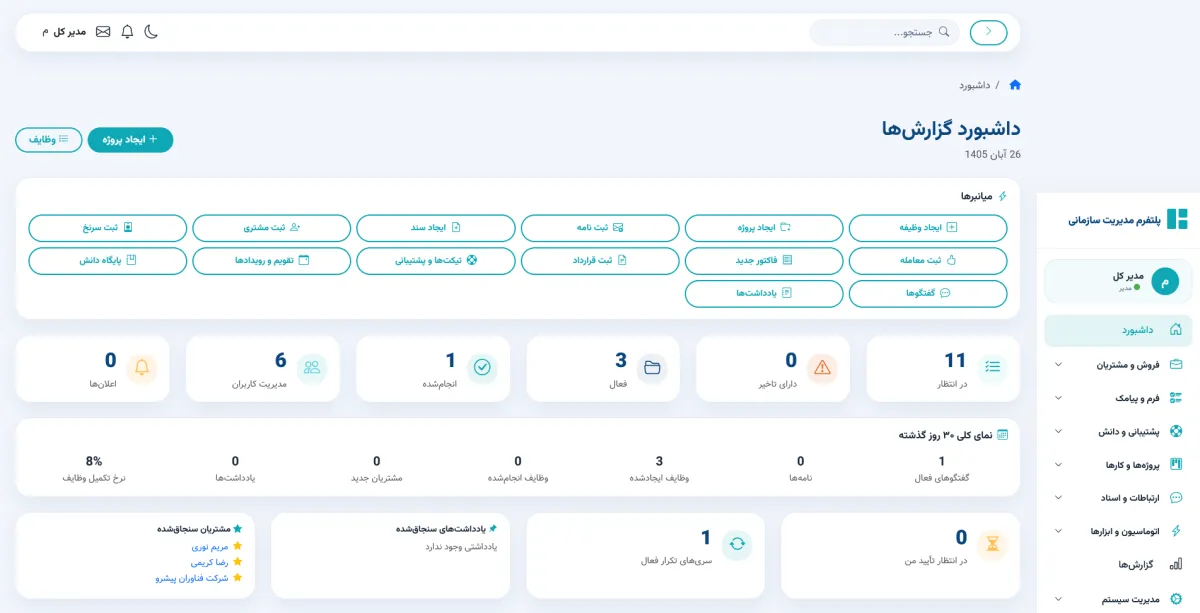
What Is Taskora?
Taskora is an all-in-one business management platform designed to help organizations manage customers, sales, projects, tasks, team collaboration, documents, workflows, and business operations in one centralized environment. Instead of buying and maintaining separate tools for CRM, project management, team collaboration, and workflow automation, Taskora delivers these capabilities in a single system with native integration between them.
Taskora is built for businesses that, as they grow, struggle with the chaos of disconnected tools, the lack of a unified view of the organization, and the rising cost of running a stack of separate subscriptions. The goal is simple: every employee, manager, and team works from a single source of truth, and every decision is based on real-time data.
Why Businesses Need an All-in-One Business Management Software
Most small and medium businesses start with tools they already have: a spreadsheet for sales tracking, a chat app for team communication, a file-sharing drive for documents, and maybe a simple task board. These work in the early days, but as the team, customer base, and project list grow, four problems emerge:
- Scattered data: Customer data in the spreadsheet, notes in chat, files in the drive, and tasks in another tool. No one knows which copy is current.
- Hidden costs: Multiple separate subscriptions, integration glue, training for each tool, and time spent switching between them.
- No management visibility: Leaders cannot see at a glance which project is in which stage or how this month's sales compare to last.
- Collaboration quality drops: When teams use multiple channels, messages get lost and decisions are not documented.
An all-in-one business management software like Taskora solves these problems by focusing on a single environment: all data in one place, all communication in one system, all reports from one source.
Core Features and Capabilities of Taskora
Taskora's capabilities are organized in modules built on a unified architecture. Each module works independently but connects naturally to the others. The list below is a high-level overview of these modules; the exact field-level details and permissions must be reconciled with the final product documentation.
User Management and Access Control
Taskora lets administrators define users, create multiple roles (admin, project manager, sales rep, team member, guest), and set precise access levels for each role. Role-Based Access Control ensures each user only accesses the parts they are responsible for.
- Define employees, roles, and organizational units
- Granular permissions per module and per field [NEEDS CONFIRMATION]
- Activity log for audit and security
- Multi-tenant team support [NEEDS CONFIRMATION]
CRM and Customer Management
This module keeps current and potential customers in a centralized database. All interactions (calls, emails, notes, meetings) are attached to the customer profile, automatically or manually, so the sales rep, sales manager, and support team all use the same history.
- Full customer profile with interaction history
- Customer segmentation by industry, value, status, geography
- Advanced tagging and filtering for fast lookup
- Call and note logging (manual or via integration) [NEEDS CONFIRMATION]
- Custom fields for business-specific data [NEEDS CONFIRMATION]
Lead Management and Sales Workflow
Taskora's lead module gathers inbound leads from multiple channels (website, forms, email, social), displays them in a drag-and-drop sales kanban, and manages the journey from lead to opportunity, to customer, to contract through a customizable workflow.
- Sales kanban with customizable stages (default: Lead → Call → Demo → Proposal → Negotiation → Closed)
- Automatic probability and forecast value calculation
- Auto-assignment rules (round-robin, geography, industry) [NEEDS CONFIRMATION]
- Sales funnel report and stage-by-stage conversion velocity
- Smart alerts for stale leads
Project and Task Management
This module is designed for teams running multiple parallel projects. Each project is broken down into phases, tasks, and subtasks; each task has an owner, due date, and dependencies; progress is visualized on a Gantt, kanban, or list view.
- Kanban, Gantt, calendar, and list views — selectable per project
- Task dependency management
- Milestone and key step definition
- Time estimation vs. actual spent time
- Native link between tasks and CRM customer profiles
Team Communication and Collaboration
Taskora keeps team communication in the same system where the work happens. Instead of scattering across WhatsApp, Telegram, or email, comments, mentions, and discussions are attached to the relevant task, project, or customer.
- Comments at task, project, and customer level
- @mention with in-app notifications
- Group chat at project or team level
- File sharing in chat with automatic storage in the Documents module
Document and File Management
The Documents module is a centralized home for organizational files, contracts, invoices, and project documents. Each file links to an entity (customer, project, task) so it is easy to find later.
- Customizable folder structure with permissions
- Document versioning [NEEDS CONFIRMATION]
- Secure sharing with public or expiring links [NEEDS CONFIRMATION]
- Full-text search in file contents [NEEDS CONFIRMATION]
Finance, Invoices, and Contracts
Taskora's finance module connects invoices, contracts, payments, and expenses to the sales and project modules. An invoice issued to a customer is automatically linked to their profile and the relevant project.
- Invoice generation with customizable templates [NEEDS CONFIRMATION]
- Payment tracking and receivables follow-up
- Contract management with expiration dates and renewal alerts
- Invoice-to-project link for profitability analysis
- Cash flow report [NEEDS CONFIRMATION]
AI and Knowledge Base
Taskora includes an in-app Knowledge Base where the team can store process documentation, FAQ answers, and operating procedures. When AI support is enabled [NEEDS CONFIRMATION], this knowledge base powers a smart assistant that can answer team questions, suggest the next step in a process, or summarize the state of a customer.
- Article authoring with categories and tags
- Markdown support and simple formatting
- AI assistant connected to the knowledge base [NEEDS CONFIRMATION]
- Automatic summaries of meetings and notes [NEEDS CONFIRMATION]
Workflow and Automation
Taskora's automation module lets administrators define conditional rules (Trigger → Action). For example, when a lead reaches the "Demo" stage, a "Prepare demo" task is automatically created for the technical team.
- Triggers based on field change, status change, date, or event
- Action types: create task, send email/message, update field, add to kanban [NEEDS CONFIRMATION]
- Ready-made templates for common processes (lead follow-up, contract renewal, recurring tasks)
- Reporting and monitoring of automation runs
Reporting and Management Analytics
Taskora provides customizable dashboards for managers that display key organizational KPIs at a glance. Default reports cover sales, projects, teams, and finance; custom reports can be built with drag-and-drop.
- Customizable dashboard with various widgets
- Sales funnel, conversion velocity, and rep performance reports
- Project productivity, delay, and margin reports
- Export reports to Excel and PDF [NEEDS CONFIRMATION]
- Adjustable time ranges and period-over-period comparison
Additional Management Features
- Dual calendar (Jalali + Gregorian) support [NEEDS CONFIRMATION]
- Multi-language UI (Persian/English) [NEEDS CONFIRMATION]
- iOS and Android mobile app [NEEDS CONFIRMATION]
- Public API for third-party integrations [NEEDS CONFIRMATION]
- Webhooks for key events [NEEDS CONFIRMATION]
- SSO (Single Sign-On) support [NEEDS CONFIRMATION]
- Audit log and security report [NEEDS CONFIRMATION]
Benefits of Using Taskora
Taskora's benefits fall into three categories: cost reduction, productivity increase, and better decision-making.
Cost Reduction
- Replace multiple subscriptions (CRM, project, collaboration, automation) with one
- Reduce user training time and cost (one interface, one logic)
- Eliminate developer time spent on cross-tool integrations
Productivity Increase
- Native integration between modules (invoices link to customers, tasks link to projects)
- Automation of repetitive processes (follow-ups, reminders, assignments)
- Less context switching and better team focus
Better Decision-Making
- Management dashboard with real, up-to-date data
- Comparative reports for pattern and trend identification
- Centralized knowledge base to retain institutional knowledge
Who Is Taskora For?
Taskora is a fit for businesses that match these conditions:
- Teams of 5 to 200 people working with multiple disconnected tools and experiencing data chaos
- Businesses that combine active sales (CRM) with project delivery (agencies, services, IT, consulting)
- Startups in growth mode that want a unified foundation from day one
- Mid-sized companies migrating from a stack of separate systems to a unified platform
- Organizations that need a reliable, real-time management dashboard for decision-making
Real-World Use Scenarios for Taskora
Scenario 1: 20-Person Digital Marketing Agency
A 20-person digital agency serves 30 clients. Before Taskora, customer data lived in a spreadsheet, tasks in Asana, files in Drive, conversations in WhatsApp. With Taskora, all of this lives in one platform. The manager can see which client owns which project, which team is on which task, and which invoice is unpaid. Result: a 40% reduction in weekly reporting time.
Scenario 2: 50-Person Software Company
A software development company has a sales team, a technical team, and a support team. Before Taskora, a lead came in by email, a sales rep entered it in a spreadsheet, and when a contract closed, a task was created in Jira for the technical team. With Taskora, leads arrive from a web form, land in the sales kanban, and when converted to a customer, automatically create a project for the technical team and a profile for the support team.
Scenario 3: 10-Person Consulting Firm
A 10-person consulting firm runs short 2–8 week engagements. Before Taskora, time on each project was entered in a spreadsheet and analyzed at the end of the month. With Taskora, time tracking is tied to tasks and at the end of each engagement, profitability is automatically calculated. Result: loss-making engagements are flagged before they happen.
Unified Management vs. Scattered Tools
The table below shows the key difference between the two approaches:
| Metric | Scattered Tools | Taskora (Unified) |
|---|---|---|
| Monthly subscriptions | 4–6 separate subscriptions | One subscription |
| User learning curve | Different UI and logic per tool | One UI, one logic |
| Integration | Needs Zapier or developer time | Native integration |
| Customer data | Spread across multiple systems | Centralized |
| Management reporting | Excel from multiple sources | Centralized dashboard |
| Total cost (TCO) | High (subs + integration + training) | Low |
| New user ramp-up | Days | Hours |
Frequently Asked Questions (FAQ)
Is Taskora suitable for small businesses?
Yes. Taskora is designed for teams of 5 to 200. Smaller businesses can use a starter plan with a reduced feature set. [NEEDS CONFIRMATION — confirm the final pricing tiers]
Is my data secure?
Taskora is delivered on a secure platform with encryption in transit (TLS) and at rest. [NEEDS CONFIRMATION — confirm security certifications, ISO 27001 status, and data residency]
Can I migrate my existing data to Taskora?
Yes. Taskora supports import from Excel, CSV, and likely from other CRMs. For more complex migrations, the Taskora support team can help. [NEEDS CONFIRMATION — confirm migration tooling]
Does Taskora have a mobile app?
When supported [NEEDS CONFIRMATION], iOS and Android mobile apps are available for tasks, conversations, and reports.
Can I try Taskora before buying?
Yes. A free demo or trial is available. [NEEDS CONFIRMATION — confirm trial duration and limits]
Is Taskora customizable?
Yes. Custom fields, configurable workflows, and report builders let users tailor Taskora to their specific business process.
Conclusion and Call to Action
Taskora is not just software; it is a strategic decision for businesses that want to move from a scattered tool stack to a unified system. If your team uses more than five separate tools to run the business, if your management reports are always late or inaccurate, and if your CEO cannot see the state of the organization at a glance, the time to migrate to Taskora has arrived.
Request a demo or start a trial through the contact page or signup form. The Taskora sales team will reach out and walk you through the implementation process.
Comments 0
No comments yet. Be the first to comment.
Leave a comment