
Digital Product
Persian Enterprise Webmail Script
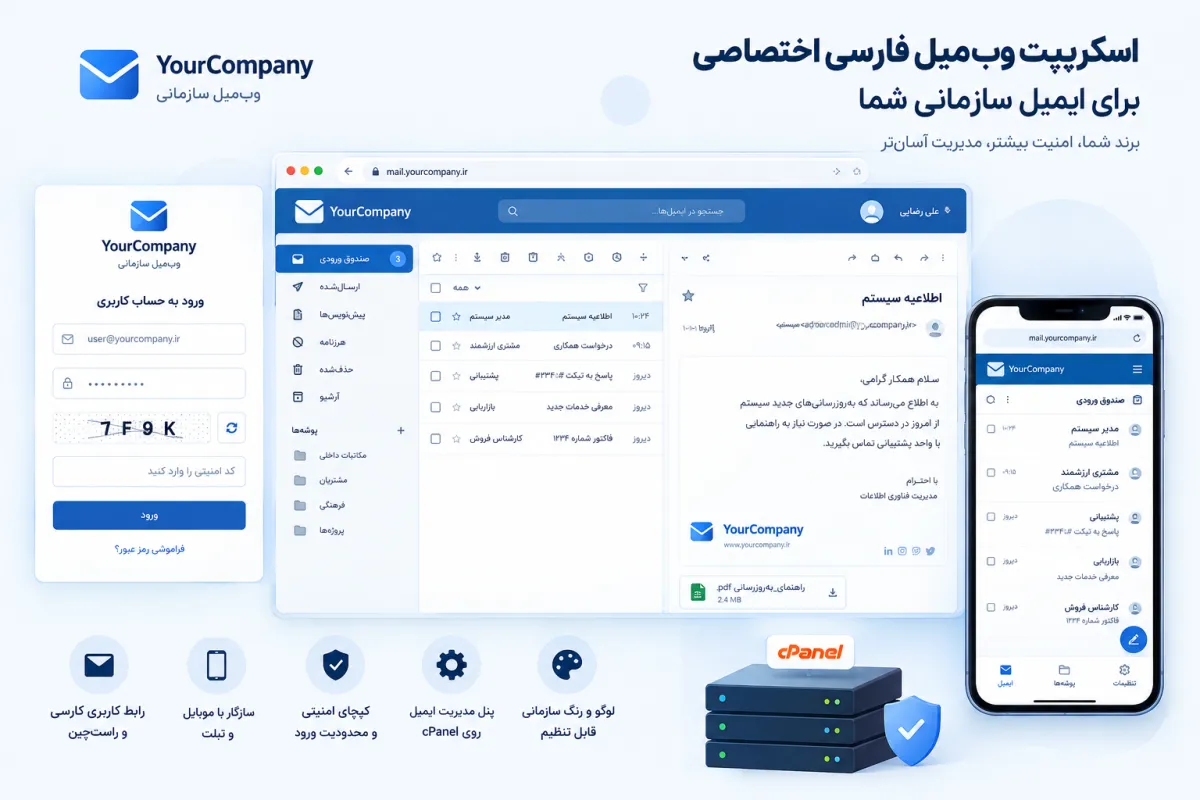
Persian Webmail Script — Branded Email for Your Company
Company email on your own domain looks professional only when the login page is also yours. This Persian webmail script installs on your own hosting with your logo, brand color, company name and footer. It runs entirely in a browser; no terminal, no programming knowledge, and no dedicated server required. Your team visits mail.company.ir, sees your own brand, signs in with a server-side captcha, and lands directly in their inbox.
- Browser-based installer that self-deletes when setup is complete
- Your brand: customizable logo, primary color, company name and footer
- cPanel email manager to create, edit and remove mailboxes
- Full Persian right-to-left UI, mobile-friendly and Vazirmatn-powered
Primary button: Buy and Get Install Code | Secondary button: View Installation Guide
Why a Custom Webmail? And What Features Does It Have?
The default webmail shipped by your hosting provider opens under the hosting company's brand, on an unfamiliar port and address, and immediately puts your customer or colleague in a state of confusion. That not-quite-professional experience quietly weakens your brand image at the very first touchpoint where the recipient checks their email. In a market where trust is the first thing that gets bought, this weakness has a price. When your login URL is webmail.somehosting.com:2096, the unintended message is that you are still riding on someone else's infrastructure and lack an independent visual identity. This product turns your email login into a dedicated page with your own visual identity — for example mail.company.ir with your logo, color and footer.
Technically, this webmail runs on any PHP host that supports the IMAP and SMTP standards — meaning cPanel, DirectAdmin, Plesk, and any standard PHP hosting. The IMAP/SMTP connection means your existing mailboxes and passwords stay untouched and no data migration is required. You can launch a branded email login in a matter of minutes, without moving any email, without service interruption, and without advanced technical knowledge.
Webmail (on any PHP host)
- Read, write, reply and forward email with attachments and inline images
- Folder management, full-text search, preview and print
- Persian and English email templates with your logo, color, contact info and signature
- Right-to-left UI with Vazirmatn font and proper mobile rendering
- Login with server-side image captcha, login attempt limits and encrypted sessions
- In-app password change for users (on cPanel hosts)
Email Manager (on cPanel)
- Create, delete and change mailbox passwords without logging into cPanel
- Bulk mailbox creation: paste a list from Excel or upload an .xlsx / .csv file
- Per-mailbox quota and access control
- Multi-domain support, IP-based access restriction and change audit log
- Protection for critical mailboxes to prevent accidental deletion
Who Is It For? And How Simple Is Installation?
This product is designed for these groups:
- Companies and organizations that want to open employee email under their own brand identity
- Hosting companies and web designers delivering branded Persian webmail to their clients
- IT managers and staff who need to create many mailboxes at once (e.g. 30 employees from an Excel file)
- Small businesses that already have hosting but are not satisfied with the default webmail interface
Installation in Three Steps
- 1. Prepare the host: create a subdomain (e.g. mail.company.ir), enable SSL and select PHP 8.1 or higher.
- 2. Upload: upload the zip file in the host's File Manager and extract it.
- 3. Browser install: open install.php, enter the install code and brand details. The installer tests the connection to the email server and cPanel before writing any settings, then deletes itself when finished.
A complete walkthrough — from creating the subdomain to the first user login — ships inside the package as a Persian PDF guide. Even if you have never set up a custom webmail before, you can do it with this guide.
Will It Work on My Host? (cPanel, DirectAdmin and others)
The webmail itself works against the IMAP/SMTP standard, so it runs on any host with PHP 8.1 or higher. The email manager currently uses the official cPanel API, so you can create and manage mailboxes without logging into cPanel itself. If your host runs DirectAdmin or Plesk, install the webmail in "no-panel" mode and create mailboxes from the host's own panel.
Comparison with Competitors and Alternatives
When choosing a custom webmail, comparing it against common alternatives makes the differences clear at first glance. There are three main categories on the market: default host webmails (Roundcube, SquirrelMail), public email services (Gmail, Yahoo) and paid enterprise email suites such as Google Workspace or Microsoft 365.
Roundcube and SquirrelMail are solid tools, but their weak Persian interface, lack of branding, manual installation and absence of a bulk creation panel make them insufficient for an organization that wants branded, right-to-left email. Gmail and Yahoo are not designed for company-domain email at all, and even when you connect your domain, the provider's own brand remains visible in the top bar. Google Workspace and Microsoft 365 are very complete but charge per user per month and do not allow a Persian right-to-left branded login page.
Real-World Use Cases
Mid-size 50-person company with a corporate domain
A 50-employee company wants all official email under the company.ir domain. The IT manager sets up the subdomain in under an hour, uploads the file, finishes the install with install.php, then drops the 50-employee Excel list into the bulk-creation panel and creates every mailbox in one click. Each employee visits mail.company.ir, sees the company logo, and signs in with the image captcha.
Web design agency with 10 corporate clients
An agency that builds websites wants to deliver a branded webmail — carrying each client's own logo and color — instead of the default host webmail. With this script, the agency installs one instance per client, sets the brand at install time, and ships a higher-value service that translates into higher conversion in future negotiations.
Hosting company with 100 users and multiple domains
A hosting company wants to give customers a branded email login experience. It defines multiple domains in settings, applies IP-based access restrictions to the management panel, and keeps the change log for audit. With critical-mailbox protection, it prevents accidental deletion of the CEO's inbox.
Detailed Technical Specifications
This section is for the technical lead who wants to verify the host is compatible before purchase. All values are minimums; on hosts with more resources, performance will be better.
Security and What's Inside the Package
Email security means protecting the company's passwords and correspondence. In this product, security is implemented in the code itself, not as a plugin you have to enable later. Below is the candid list of what's in this version, and what's still on the roadmap.
Implemented security features
- Server-side image captcha, single-use and expiring
- Login attempt limits per IP and per account
- CSRF and session-fixation protection, encrypted session passwords
- Safe HTML email rendering (HTMLPurifier + isolated iframe) to block malicious scripts in email
- Forced HTTPS and browser security headers (CSP and similar)
- Installer with single-use code that deletes itself after install
Honest note: two-factor authentication (2FA) and audio captcha are not yet in this version and are on the development roadmap.
Package contents
- Full application source plus browser-based installer
- Step-by-step Persian installation guide
- Compatibility, branding customization and security notes
- Your dedicated install code in a separate file
Enterprise Email Security Checklist
This checklist does not ship with the webmail; it is a general guide that this product covers a large portion of. Use it as an annual security audit to confirm your company email is resilient against common attacks.
- 1. Enable SSL on the subdomain and force HTTPS on every page
- 2. Use a server-side image captcha on the login page and admin panel
- 3. Limit failed login attempts per IP and per account
- 4. Encrypt sessions and refresh cookies periodically
- 5. Enforce a strong password policy (min 12 chars, mixed case, digits and symbols)
- 6. Enable 2FA on administrator mailboxes (when supported in a future release)
- 7. Maintain an IP allow-list for management panel access
- 8. Back up mailboxes daily and retain for 30 days on a separate server
- 9. Patch PHP, the web server and the email server monthly
- 10. Train users to spot phishing and not click unknown links
Migration Roadmap from Roundcube
If you are currently on Roundcube or SquirrelMail and want to migrate to this custom webmail, the process is straightforward and can be done without service interruption. Since both webmails connect to the same IMAP server, the emails themselves are not moved; only the user interface changes.
- 1. Back up: export critical mailboxes using an IMAP tool like imap-tools, or manually in Thunderbird.
- 2. Create subdomain: set up a new subdomain such as mail.company.ir (or keep the old webmail path with a new route).
- 3. Install new version: upload the file and run install.php; fill in the IMAP/SMTP settings using the same values as the old Roundcube config.
- 4. Test: log in with a few test mailboxes and confirm the inbox list, send and receive are intact.
- 5. Redirect: send the old webmail URL with a 301 redirect to the new branded address, so users are auto-routed to the new login.
- 6. Remove old version: after a week without issues, delete the old Roundcube files.
Frequently Asked Questions
Question: Do I need a terminal or programming knowledge?
No. Installation happens on a single browser page; you only need to upload the files in your host's File Manager. If you can extract a zip file on your host and open a URL in your browser, you can complete the install.
Question: Does it install on a DirectAdmin host?
Yes, the webmail installs and works fully. The email manager is currently cPanel-specific, so you create mailboxes from DirectAdmin itself. Installation on Plesk and other PHP hosts works too.
Question: Will my existing emails keep their old passwords?
Yes. The webmail connects to the same IMAP and SMTP server; mailboxes and passwords stay unchanged. No data migration is needed. You can also create multiple mailboxes with existing passwords from an Excel file on a new host (on cPanel).
Question: How many users and domains are supported?
There is no software-imposed user limit; the real limit is your host's resources. Multiple domains can be defined in settings and each domain can have its own mailboxes.
Question: How do I change the logo and color?
You set the logo, color, company name and footer at install time, and they can be changed later by editing a few simple files. No reinstall is required, and no technical knowledge is needed.
Question: Is support included?
Yes; the support duration and channel (ticket or Telegram) and update windows are shown on the sales panel and are visible at purchase time.
Question: Can I resell it to my own customers?
It depends on your license. Three license tiers (single install, 5 installs, unlimited) are available on the sales panel, so you can pick what fits your needs. Footer-removal and resale rights differ per tier.
Launch Your Branded Webmail Today
The complete package, step-by-step guide and your dedicated install code are delivered immediately after payment. Price, license type, update window and support are visible on the sales panel and you install it on your own domain.
Download Files
- webmail-product.zip
Download becomes available after a successful purchase.
Comments 0
No comments yet. Be the first to comment.
Leave a comment